 Skip to content
Quick answer: how do I log in to Maanwin?
Open the Maanwin login screen, type your 10-digit mobile number after +91, enter your password and tap Login. There is no username. The same details work in a phone browser, on a laptop and in the Maanwin app. New here? Create a Maanwin account first. Forgot the password? Use the Maanwin forgot password steps.
Step by step
What are the Maanwin login steps?
Maanwin login takes four steps: open a trusted link, enter your number, enter your password and tap Login.
- Open the login page. Tap Log in on this site, or open the Maanwin app.
- Enter your mobile number. The field already shows +91. Type the number you registered with, without spaces or a leading zero.
- Enter your password. Tap the eye icon to check what you typed. Passwords are case-sensitive.
- Tap Login. The home screen opens and “Your Balance” shows your wallet amount instead of dashes.
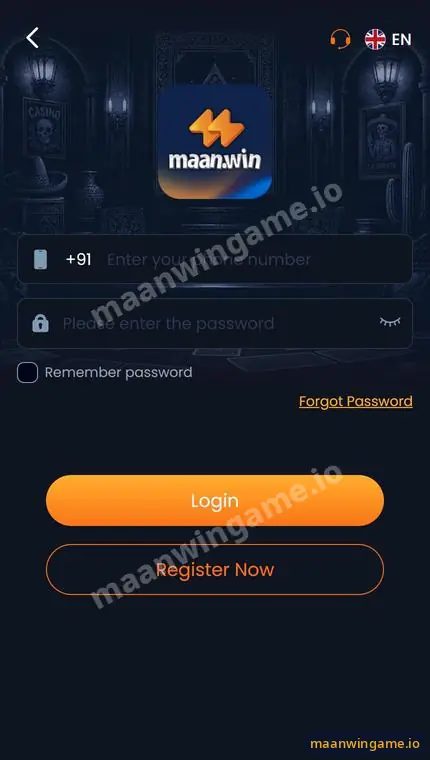
Login screen
What is on the Maanwin login screen?
The login screen has five parts: the phone field, the password field, Remember password, Forgot Password and two buttons.
| Element | What it does | Tip |
|---|---|---|
| +91 phone number | Your login ID | Use the exact number from sign-up |
| Password | Your secret key | Never share it, even with support |
| Remember password | Keeps you signed in on this device | Tick it only on your own phone |
| Forgot Password | Starts a reset | See the reset guide |
| Login / Register Now | Sign in, or open the sign-up form | Register Now is for new players |
| Headset icon and EN | Customer care and language | Use the headset for login help |
After login
What can I do after I log in to Maanwin?
After login you can deposit, play, claim promotions and check your invite code.
Your balance appears on the home screen. The bottom bar takes you to Promo for campaigns and gift codes, Earn for your invite code and commission, and Profile for the wallet, deposit, withdraw and history. If you plan to add money, read the Maanwin deposit guide first, and look at the Maanwin homepage for an overview of every game.
App or browser
Is the Maanwin login the same on the app and the website?
Yes. One account, one password and one wallet work on every device.
You can sign in on Chrome, Safari, a laptop or the Android app with the same number and password, and your balance, bonuses and history follow you. If you would rather use the app, follow the Maanwin APK download guide.
Account safety
How do I keep my Maanwin login safe?
Keep your password private, use only trusted links, and log out on shared phones.
- Use a password you do not use for email, UPI or banking.
- Bookmark the login page after your first visit; fake pages copy the design.
- Never share your password, OTP or UPI PIN. Real staff never ask for them.
- Untick Remember password on any phone that is not yours.
- If a login page asks for your UPI PIN, close it. Login only needs your number and password.
Troubleshooting
Why can’t I log in to Maanwin?
Most failed logins come from a wrong number or password, a weak connection, an old app or a fake link.
| Problem | Quick fix |
|---|---|
| Password incorrect | Retype it slowly, then use Forgot Password |
| Account not found | Check the number; you may have used another SIM |
| Page keeps loading | Switch Wi-Fi and mobile data, clear the browser cache |
| App will not open | Reinstall the latest app from Download APP |
Each symptom has its own fix on the Maanwin login problem page.
FAQ
Maanwin login FAQ
Do I need a username for Maanwin login?
No. You sign in with your registered +91 mobile number and your password.
Can I log in to Maanwin on two phones?
Yes, with the same details. Log out of phones you no longer use and never share your password.
Does Maanwin login need an OTP every time?
A normal login uses your number and password. A verification code may be used for sign-up or a password reset. Never share it.
What does Remember password do?
It keeps your details on that device so you sign in faster. Use it only on your own phone.
Is Maan Win login the same as Maanwin login?
Yes. Maan Win and maan.win are other names for the same platform.
Why does the login page look different today?
The app updates its design from time to time. If the address or layout looks suspicious, close it and use a trusted link.
Summary
Key takeaways
- Log in with +91 mobile number and password; there is no username.
- One account works on website and app.
- Tick Remember password only on your own phone.
- Forgot Password is on the login screen.
- Never type your UPI PIN on a login page.
