 Skip to content
Quick answer: what is the Maanwin app?
The Maanwin app is the mobile version of the platform: the same lobby, wallet, Promo tab, Earn page and Profile in a full-screen app that opens straight to your account. On Android it installs from the “Download APP for a Better Experience” banner on the home screen. On iPhone you can add the site to your home screen. One account works in the app and the browser.
Features
What can I do in the Maanwin app?
Everything you can do on the website, with fewer taps.
| Tab | What it holds |
|---|---|
| Home | Balance, banners, Daily Check in, Deposit Wheel, Popular games, Games hub |
| Promo | Twelve campaigns and the Enter Gift Code box |
| Centre chest | Quick access to rewards |
| Earn | Invite code, commission, invitees, rebate ratio, gift code |
| Profile | Wallet, deposit, withdraw, history, settings, support |
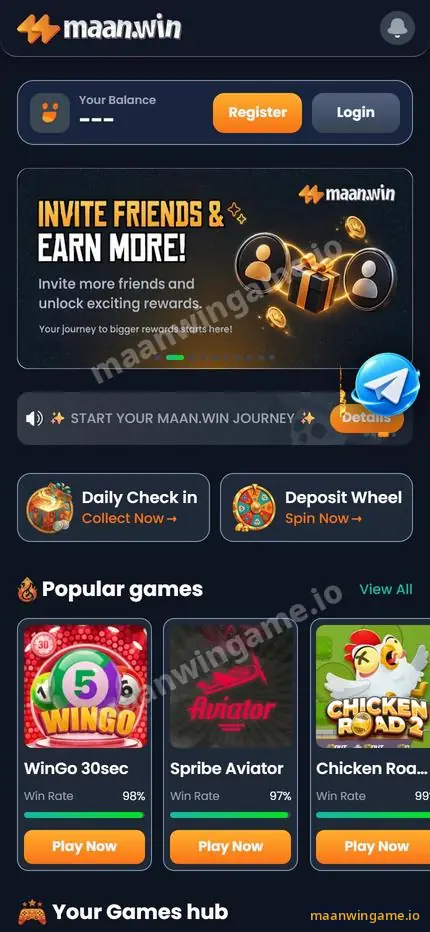
Install
How do I install the Maanwin app?
On Android, install the APK from the in-app banner; on iPhone, add the site to the home screen.
- Open Maanwin in your phone browser. Use the Log in button on this site.
- Tap the Download APP banner. It appears near the bottom of the home screen.
- Allow the install once. Android asks permission for your browser to install apps; allow it for this file.
- Open and sign in. Use your +91 number and password.
- iPhone users. In Safari, tap Share, then Add to Home Screen.
Detailed screenshots and fixes are in the Maanwin APK download guide.
Permissions
Which permissions does the Maanwin app need?
Very few. Storage for the install, and notifications only if you want alerts.
When you open Maanwin, you may see “Get free spins & bonus alerts! Tap below and press Allow”. That is a request to send notifications. It is optional, and the app works without it. Do not grant access to contacts, SMS or accessibility for a gaming app; a real app does not need them to let you play.
App vs browser
Should I use the app or the browser?
Use the app if you play daily; use the browser if you are trying Maanwin or have little storage.
| App | Browser | |
|---|---|---|
| Speed to open | Fast, one tap | Needs the address or bookmark |
| Storage | Uses some space | None |
| Alerts | Optional notifications | None |
| Same account and wallet | Yes | Yes |
Either way, the Maanwin game guide and the login steps work the same.
Updates
How do I update the Maanwin app?
Install the newest version from the Download APP banner over the old one; your account is not affected.
- If the app shows an update prompt, accept it.
- If games stop loading, reinstall from the banner.
- Never install “modded” or “hack” versions shared in groups.
Stay safe
How do I stay safe while using Maanwin?
A few habits protect your money and your account more than any feature.
- Use only the Register and Log in buttons on this site or the address you saved yourself; copycat sites copy the Maanwin look.
- Never share your login password, OTP, UPI PIN or bank card details. Real support never asks for them.
- Ignore anyone selling “prediction” tools, hacks or sure wins. Results are random.
- Decide your daily limit before you deposit and stop when it is used up.
Adults 18+ only. Real-money games can cause financial loss. Set a budget before you deposit, never chase losses and never share your password, OTP or UPI PIN with anyone, including people who claim to be support staff.
FAQ
Maanwin app FAQ
Is the Maanwin app free?
Yes, the app is free to install.
Is the Maanwin app on the Google Play Store?
We did not find it there. Install it from the Download APP banner inside Maanwin.
Does the Maanwin app work on iPhone?
Use Safari and Add to Home Screen for an app-like shortcut.
Can I use the same account in the app and browser?
Yes. One login and one wallet.
Why does my phone warn me about the APK?
Android warns about every app from outside the Play Store. Install only from the in-app banner.
Do I have to allow notifications?
No. They are optional.
Summary
Key takeaways
- The app mirrors the full Maanwin site.
- Install on Android from the Download APP banner.
- iPhone users can add it to the home screen.
- Allow notifications only if you want alerts.
- Never install modded versions.
